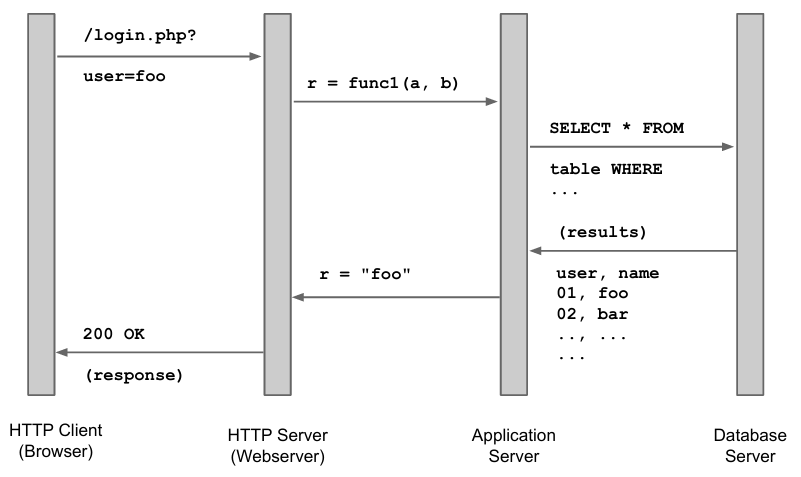
Web applications are now the current paradigm for security delivery. However, they are often exposed to the public and built on top of a stateless protocol (HTTP). The state, necessary for modern web applications, is emulated on top of HTTP and this protocol has only a weak authentication mechanism built in, also this emulated on top of the protocol itself.
The golden rule of modern web application is that the client is never trustworthy. This means that we need to filter and check carefully anything that is sent to us. For example, we cannot validate inputs on the client side through JavaScript and variables such as REFERRER (that the client is sending us containing the URL of the page that linked to the current page) can lie.
In the developer’s mindset, the user will click on the “Login” button and, as a result, the browser will generate a correct GET request to /login.php?user=foo. In the attacker’s mindset, we can craft a GET request to send /login.php?user=w|-|4t3v3r to the server. Since HTTP is text-based, it is easy to manipulate and craft requests.
For example, we can use curl to send a GET request to a server and see the headers that are sent.
$ curl -v http://httpbin.org/get
> GET /get HTTP/1.1
> Host: httpbin.org
> User-Agent: curl/7.43.0
> Accept: */*
Adding a custom header to the request is also easy with curl: simply use the -H flag followed by the header you want to add. For example, to add a custom User-Agent header to the request, you can use the following command:
$ curl -v -H 'User-Agent: foobar-agent/7.43.1' http://httpbin.org/get
> GET /get HTTP/1.1
> Host: httpbin.org
> Accept: */*
> User-Agent: foobar-agent/7.43.1          <--|
Sending POST requests is also easy with curl. You can use the --data flag followed by the data you want to send in the request. For example, to send a POST request with
$ curl --trace-ascii /dev/stdout --data user=foobar http://httpbin.org/post
0000: POST /post HTTP/1.1
0015: Host: httpbin.org
0028: User-Agent: curl/7.81.0
0041: Accept: */*
004e: Content-Length: 11
0062: Content-Type: application/x-www-form-urlencoded
0093:
=> Send data, 11 bytes (0xb)
0000: user=foobar
== Info: Mark bundle as not supporting multiuse
<= Recv header, 17 bytes (0x11)
0000: HTTP/1.1 200 OK
<= Recv header, 37 bytes (0x25)
0000: Date: Sun, 07 Jul 2024 07:49:06 GMT
<= Recv header, 32 bytes (0x20)
0000: Content-Type: application/json
<= Recv header, 21 bytes (0x15)
0000: Content-Length: 428
<= Recv header, 24 bytes (0x18)
0000: Connection: keep-alive
<= Recv header, 25 bytes (0x19)
0000: Server: gunicorn/19.9.0
<= Recv header, 32 bytes (0x20)
0000: Access-Control-Allow-Origin: *
<= Recv header, 40 bytes (0x28)
0000: Access-Control-Allow-Credentials: true
<= Recv header, 2 bytes (0x2)
0000:
<= Recv data, 428 bytes (0x1ac)
Filtering untrusted data is hard. There are three main ways to filter untrusted data: whitelisting, blacklisting, and escaping.
- Whitelisting is the safest way to filter data, as it only allows through what we expect.
- Blacklisting is less safe, as it discards known-bad stuff on top of the whitelist.
- Escaping transforms special characters into something else that is less dangerous.
As a rule of thumb, whitelisting is safer than blacklisting data and code.
Example
To filter a phone number input field, you can start by designing a whitelist that only allows numbers. You can then expand the whitelist to include numbers and special characters like
+,-, and space. You don’t need to blacklist anything in this case, and you don’t need to escape anything either.
Cross-Site Scripting (XSS)
Definition
Cross-Site Scripting (XSS) is a vulnerability that allows client-side code to be injected into a web page. This code can then be executed by the victim’s browser, leading to the theft of sensitive information, session hijacking, and other malicious activities.
There are three types of XSS:
-
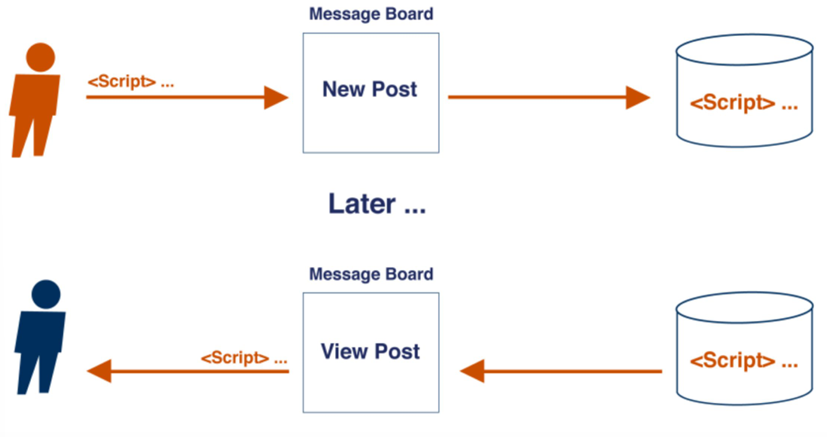
Stored XSS: This form of cross-site scripting occurs when the attacker’s input is stored on the target server, typically within a database, such as those used for message forums, visitor logs, or comment fields. Subsequently, a victim retrieves the stored malicious code from the web application, which is rendered in the browser without proper sanitization, thereby executing the harmful script (e.g., when viewing the comment).
-
Reflected XSS: This type of attack occurs when an adversary’s input is echoed back to the client by the web application within a response, such as an error message or search result. The response incorporates some (or all) of the input from the request without storing it or ensuring it is safe for rendering in the browser.
If a page has a vulnerable request handler like this:
<?php
    $var = $HTTP['variable_name'];  // retrieve content from request's variable
    echo $var;                      // print variable in the response
?>
an attacker can craft a malicious URL like this:
<a href="http://example.com/page.php?variable_name=<script>alert('XSS')</script>">Click me!</a>where, by setting the
variable_nameparameter to a malicious script (like the typicalalert('XSS')), the attacker can trick the victim into clicking the link and executing the script.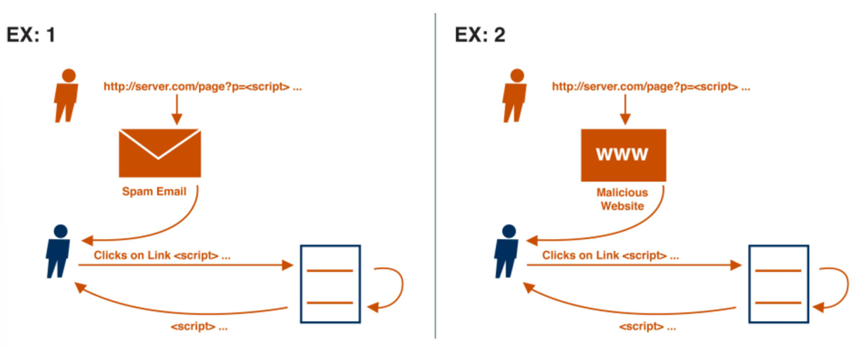
-
DOM-based XSS occurs when user input remains confined within the victim’s browser. The malicious payload is executed directly by client-side scripts, such as those modifying or updating the Document Object Model (DOM) environment, which includes dynamic pages and forms.
A script contained in the page like this:
<script>
    document.write("<b>Current URL</b> : " + document.baseURI);
</script>
can be triggered by a malicious crafted URL like this:
<a href="http://example.com/page.html#<script>alert('XSS')</script>">Click me!</a>where the
#character is used to inject the malicious script (like the typicalalert('XSS')) into the page to be displayed.
Cross-Site Scripting (XSS) can lead to severe repercussions, including the theft of cookies or hijacking of sessions, enabling attackers to manipulate sessions and conduct fraudulent transactions. Additionally, XSS allows for the unauthorized snooping of private information, facilitates drive-by downloads, and can bypass the Same Origin Policy (SOP). These vulnerabilities underscore the critical need for robust security measures to protect web applications and user data from such sophisticated and potentially damaging exploits.
Same Origin Policy (SOP)
Definition
The Same Origin Policy (SOP) is a security feature implemented by all web clients that restricts how a document or script loaded from one origin can interact with a resource from another origin.
SOP is implemented by all web clients and is based on the origin of the resource (i.e., the protocol, host, and port). It is designed to prevent malicious scripts from accessing sensitive data across different origins.
Filtering blog comments
Suppose you have a simple input field that allows users to post comments on a blog. If you don’t apply any filtering to the input, an attacker could inject malicious code like
<script>alert('XSS')</script>into the comment. This is an example of a Cross-Site Scripting (XSS) attack.To prevent XSS attacks, you need to filter the input to remove any potentially harmful content. For example, you can whitelist alphanumeric characters and some punctuation marks to allow most inputs while blocking malicious scripts. You should also escape special characters like
<and>to prevent them from being interpreted as HTML tags.Blacklisting is not the right way to handle input filtering because attackers can easily bypass specific filters by using alternative characters or encoding techniques. For example, blacklisting the
<script>tag won’t prevent attackers from injecting malicious scripts using other tags or attributes, like<applet>, <frame>, <iframe>. Even if you try to blacklistjavascript:URLs, attackers can still execute JavaScript code using other technique, like introducing spaces or adding null HTML entities (	,
,
).We can also escaping special characters to prevent them from being interpreted as HTML tags. For example, we can replace
<with<and>with>to prevent them from being treated as HTML tags.
Content Security Policy (CSP)
Definition
Content Security Policy (CSP) is a security standard that helps prevent cross-site scripting (XSS) attacks by allowing web servers to inform browsers about what content should be trusted and what should not.
CSP is like the Same Origin Policy (SOP), but with more flexible and expressive policies. CSP is implemented as a set of directives sent by the server to the client in the form of HTTP response headers. For example, you can use the Content-Security-Policy header to specify which scripts are allowed to run on your site.
Example of a CSP policy
Suppose you want to allow scripts from your own domain (
'self') and from the Google APIs domain (https://apis.google.com). The attacker can inject via XSS a script fromevil.comnamedevil.jsthat steals cookies. The CSP policy can prevent this by allowing only scripts from the specified sources.
<html> <script src="http://evil.com/evil.js" /> </html>Once the CSP policy is in place, the browser will block the script from
evil.combecause it’s not allowed by the policy. The attacker’s script will not be executed, and the user’s cookies will be safe.
CSP policies can include directives like script-src, form-action, frame-ancestors, img-src, style-src, and more. These directives specify which resources are allowed to be loaded by the browser. For example, the script-src directive allows you to specify which scripts can be executed on your site, while the form-action directive lists valid endpoints for form submissions. The implementation of CSP is up to the browser, and there are practical barriers and challenges to its adoption.
CSP is slowly gaining traction, but there are challenges to its adoption. One of the main challenges is that strict policies can break functionality, while relaxed policies can be bypassed. CSP policies need to be manually written and updated, which can be time-consuming and error-prone. Additionally, modern web pages load content from many resources, which can make it difficult to maintain and update CSP policies.
SQL Injection
Think about a simple login form that takes a username and password as input. The server-side code might look like this:
public void onLogon(Field txtUser, Field txtPassword) {
    SqlCommand cmd = new SqlCommand(String.Format(
	    "SELECT * FROM Users WHERE username='{0}' AND password='{1}';",
	    txtUser.Text, txtPassword.Text));
    SqlDataReader reader = cmd.ExecuteReader();

    if (reader.HasRows()) {
        IssueAuthenticationTicket();
    } else {
        RedirectToErrorPage();
    }
}
Definition
SQL Injection is a type of attack that allows an attacker to execute malicious SQL queries against a database. The vulnerability occurs when user input is not properly sanitized and is directly concatenated into a SQL query.
Attackers can exploit this vulnerability to steal sensitive data, modify database records, or execute arbitrary commands on the server.
SELECT *
FROM Users
WHERE username='s.zanero' AND password='s3cr3t!';
This query gets executed and, if it returns at least one row, the user is granted access. However, an attacker can craft a malicious input like this:
SELECT *
FROM Users
WHERE username='s.zanero';--' AND password='';
This query gets executed, and if the user exists, regardless of the password (because -- is a comment in SQL), it returns at least one row, and the attacker is granted access. Another example of SQL injection is
SELECT *
FROM Users
WHERE username=' OR '1'='1;--' AND password='';
that, when it gets executed, the second part of the OR condition is always truetrue, so it returns all rows, which is more than one, and the attacker is granted access. Another possible injection is:
SELECT *
FROM Users
WHERE Id='UNION ALL SELECT name, creditCardNumber, CCV2
					FROM CreditCardTable;--';
This query will show the contents of a different table if the number and data types of the columns are the same. Even the INSERT statement can be vulnerable to SQL injection. Subqueries can be used to steal sensitive data from other tables. For example:
INSERT INTO results VALUES (NULL, 's.zanero', '30L'), (NULL, 'f.maggi', '30L') --', '18')
INSERT INTO results VALUES (NULL, 's.zanero', (SELECT password FROM USERS WHERE user='admin'))--', '18')
Some SQL queries, such as the login query we saw, do not display returned values. Instead, they do stuff based on the return value. This can be exploited by attackers to infer data through blind SQL injections. For example, an attacker can craft a malicious input that triggers a specific behavior in the application, allowing them to infer sensitive information.
To prevent SQL injection attacks, you should:
-
Sanitize input data by validating and filtering it.
-
Use prepared statements (parametric queries) instead of building query strings using the string concatenation. For example, in PHP, you can use prepared statements like this:
$stmt = $db -> prepare("SELECT * FROM users WHERE username = ? AND password = ?");
$stmt -> execute(array($username, $password));
where the variables are placeholders that are not concatenated into the query string.
-
Avoid using table names as field names to prevent information leakage.
-
Limit query privileges to different users based on their roles.
Information Leaks
Definition
In computer security, information leaks refer to the unintentional exposure of confidential data, either digitally or physically, due to inadequate security measures.
Information leaks can occur in web applications due to various factors. Some common causes of information leaks include:
- Detailed error messages: When an error occurs in a web application, it is important to provide meaningful error messages to help developers diagnose and fix the issue. However, if these error messages contain sensitive information (such as database connection details, file paths, or user credentials) they can inadvertently leak important information to potential attackers.
- User-supplied data in errors: In some cases, web applications may include user-supplied data in error messages without proper sanitization. This can lead to a type of attack known as reflected Cross-Site Scripting (XSS), where an attacker can inject malicious code into the application by exploiting the error message.
- Side-channels: Information leaks can also occur through side-channels, which are unintended channels of communication that reveal information based on the application’s behavior. For example, the time it takes for a web application to respond to different requests can provide insights into the underlying data or algorithms being used.
- Debug traces: During development, developers often enable debug traces to help diagnose issues and track down bugs. However, if these debug traces are left active in a production environment, they can expose sensitive information such as server and application versions, database names, and even the structure of the database.
Success
Preventing information leaks in web applications requires careful consideration and implementation of security measures. This includes:
- Ensuring that error messages do not contain sensitive information and are properly sanitized before being displayed to users.
- Implementing input validation and sanitization techniques to prevent user-supplied data from being used in error messages or other vulnerable areas of the application.
- Disabling or removing debug traces in production environments to prevent the exposure of sensitive information.
- Regularly reviewing and updating security practices to stay ahead of emerging threats and vulnerabilities.
By taking these steps, web application developers can significantly reduce the risk of information leaks and protect the confidentiality of sensitive data.
Password security
Passwords are a critical aspect of web application security, and it is essential to handle them with outmost care. Storing passwords in plain text is a major security risk, as it exposes user credentials to potential attackers. To mitigate this risk, passwords should be hashed and salted before storing them in a database.
Hashing is a one-way process that converts a password into a fixed-length string of characters. This ensures that even if the database is compromised, the original passwords cannot be easily retrieved. Salting adds an extra layer of security by appending a unique random string, known as a “salt”, to each password before hashing. This prevents attackers from using precomputed tables, such as rainbow tables, to crack passwords.
In addition to secure storage, the password reset mechanism should also be robust. Sending temporary passwords via email or relying on security questions alone can be easily exploited by attackers. Instead, it is recommended to use a combination of secure methods, such as sending a password reset link with a time-limited token to the user’s registered email address.
Furthermore, it is crucial to enforce strong password policies to ensure that users choose passwords that are resistant to brute-force attacks. This includes:
- requiring a minimum length
- mix of uppercase and lowercase letters, numbers, and special characters.
Additionally, implementing mechanisms to detect and prevent common passwords, such as “password123” or “123456”, can further enhance password security.
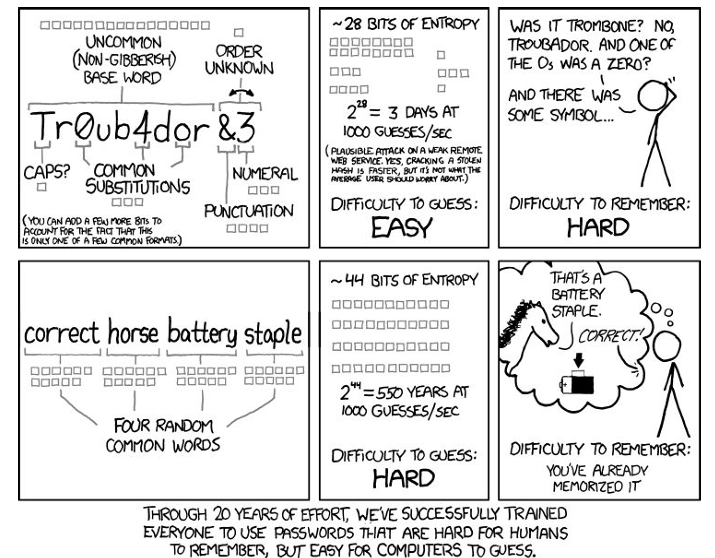
By following these best practices, web applications can significantly reduce the risk of unauthorized access to user passwords and enhance overall security.
Info
Remember, protecting user passwords is not just a legal requirement but also a responsibility towards maintaining user trust and safeguarding their sensitive information.
Cookies
The HTTP protocol is stateless and almost unidirectional. However, a modern web application needs to keep track of the user’s session, preferences and other data. Cookies are used to store this information on the client’s computer and send it back to the server with every request.
Definition
A cookie is a small piece of data stored on the client’s computer by the web server. It is used to store information about the user’s session, preferences, and other data that can be accessed by the server.
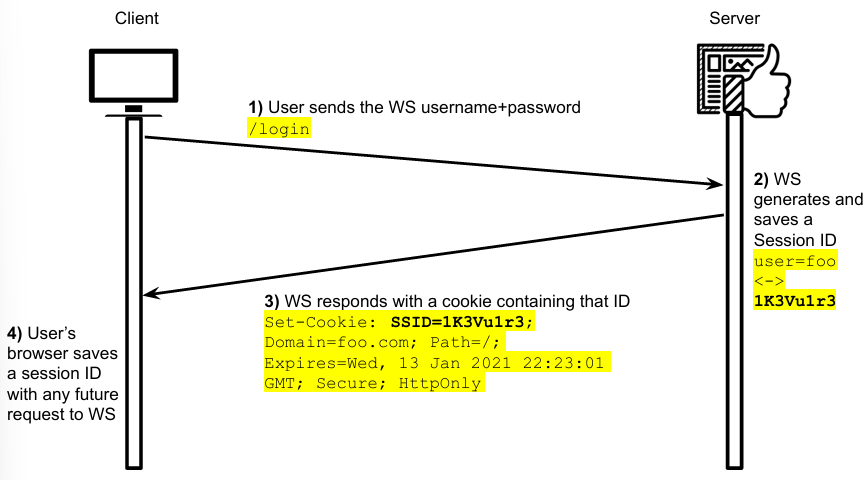
- Session cookies are used to store information about the user’s session, such as the user’s ID, authentication status, and other session-related data. These cookies are sent with every request to the server and are used to maintain the user’s session state.
- Concurrence cookies are used to store information about the user’s preferences, such as language settings, theme preferences, and other user-specific data. These cookies are sent with every request to the server and are used to personalize the user’s experience.
- Persistent cookies are used to store information that persists across sessions, such as login credentials, shopping cart items, and other persistent data. These cookies are stored on the client’s computer and are sent with every request to the server.
There are several security risks associated with cookies that web developers should be aware of. One common risk is session hijacking, where attackers can steal session cookies and impersonate legitimate users, gaining unauthorized access to sensitive information. Another risk is expired cookies, which if not properly expired, can still be used by attackers to access sensitive data. To mitigate these risks, it is important to ensure that cookies are stored encrypted and signed to prevent tampering. By implementing proper security measures, web developers can protect user data and maintain the integrity of their web applications.
Cross-Site Request Forgery (CSRF)
Definition
Cross-Site Request Forgery (CSRF) is a type of attack that tricks the user into executing unwanted actions on a web application in which they are authenticated. The attack is carried out by exploiting the user’s trust in the web application.
CSRF attacks can be prevented by using anti-CSRF tokens, which are unique tokens generated by the server and included in each request to verify the authenticity of the request.
Key concepts:
- Cookies are used for session management and user authentication.
- All the requests originating by the browser come with the user’s cookies (cookies are ambient credentials).
- Malicious requests are routed to the vulnerable web application through the victim’s browser.
- Websites cannot distinguish if the requests coming from authenticated users have been originated by an explicit user interaction or by a malicious script.
Possible mitigations for CSRF attacks include:
- Using anti-CSRF tokens to verify the authenticity of requests.
- Implementing the
SameSitecookie attribute to prevent cross-site request forgery.
CSRF tokens are unique tokens generated by the server and included in each request to verify the authenticity of the request. Here’s how they work:
- Token Generation: The server generates a unique CSRF token for each user session or for each request, depending on the implementation.
- Sending the Token to the Client: The token is sent to the client, typically as part of an HTML form or through an HTTP response that the client can read.
- Including the Token in Requests: The client must include this token in every subsequent request that requires a state change on the server (e.g., form submission, POST requests). This can be done by including the token as part of the form data or as an HTTP header.
- Token Verification on the Server: When the server receives a request that requires a state change, it verifies that the CSRF token included in the request matches the one generated for that user session. If the tokens match, the request is considered legitimate; otherwise, it is rejected.
These tokens are not automatically sent with every request like cookies. Instead, they must be explicitly included in requests by the client (e.g., as part of the form data or as a custom HTTP header). This mechanism ensures that only requests that have been intentionally crafted with the CSRF token (indicating they come from a trusted source, i.e., the original website) will be accepted by the server.
The SameSite cookie attribute is used to prevent cross-site request forgery by restricting the cookie to the same site that set it. This attribute can be set to Strict to prevent the cookie from being sent in cross-site requests or Lax to allow the cookie to be sent in cross-site requests initiated by a top-level navigation.