Definition
A computing infrastructure is a technological infrastructure that provides hardware and software for computation to other systems and services.
There are many examples of computing infrastructures, like:
- Internet of Things (IoT)
- Embedded Systems
- Personal Computers
- Edge Computing
- Data Center
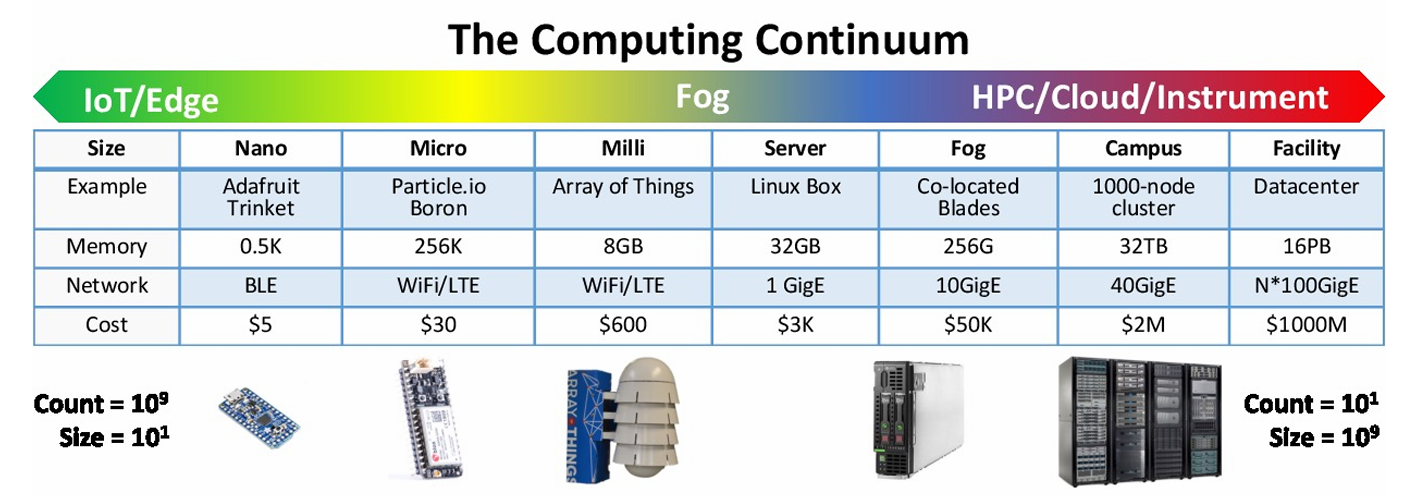
This classification is not based on closed clusters. All the examples are interconnected to each others, creating what is called a computing continuum. This means that there is always some solution in the middle of any of the categories before mentioned. All the infrastructure between the IoT/Edge device and the HPC/Cloud is called Fog Computing.
Internet of Things (IoT)
Definition
An Internet of Things (IoT) computing infrastructure is a network of interconnected devices that can communicate with each other and with other systems over the internet.
These devices are embedded with sensors that collect data and transmit it over a wireless connection. Their computing power is very limited, due to the fact that they are designed to be small and energy efficient, in order to be battery powered. This means that all the processing of the collected data do not happen on the device itself, but on a nearby device or on a cloud server. Their programming is also limited, because they are designed to perform specific tasks and they use programming languages that are not very common and very platform specific (like Arduino IDE - using a C style programming language - or STM32Cube IDE).
Some example of IoT devices are the Arduino computing platform and the STM32 microcontroller.
- Pros
- Highly Pervasive: they can be placed anywhere, even in the most remote locations where the power supply is not available (landscape, agriculture, etc.)
- Wireless connection: they can communicate with other devices and systems over the internet using specific protocols like MQTT, CoAP, etc.
- Battery Powered: batteries are used to power the devices in order to be always on
- Low costs: they are very cheap to produce and to buy, because they are designed to be disposable
- Sensing and actuating: they can sense the environment and actuate on it (like turning on a light, open a door, etc.)
- Cons
- Limited computing power: due to their size and energy efficiency
- Constraints on energy (battery): they must be powered with batteries (in particular for emergency or power failure situations)
- Constraints on memory (RAM-FLASH): because they do not perform complex tasks on data
- Difficulties in programming: they use specific programming languages and specific IDEs
Embedded Systems
Definition
An Embedded System is a computing infrastructure that is designed to perform a specific task or set of tasks in a specific environment.
These systems are embedded in other devices, such as cars, appliances, and medical devices and are designed to be small, energy efficient, and reliable, easy to use and maintain. The most well known example of an embedded system is the Raspberry Pi computing platform.
These devices are no more limited in power consumption, because they could be powered with battery (in particular for emergency or power failure situations) or with a power supply. They are also not limited in programming, because they can run a full operating system, like Linux, and be programmed with standard programming languages like C, C++, Python, etc. They are also not limited in hardware design because they can host many different peripherals like cameras, displays, and other sensors.
- Pros
- High performance units: they can perform complex tasks on raw data (like image processing, video processing, etc.)
- Availability of development boards: there are several development boards that can be used to develop embedded systems
- Programmed as PCs: they can run a full operating system like Linux and can be programmed with standard programming languages like C, C++, Python, etc.
- Large community: there are a lot of people that are working on embedded systems and that can help you to solve your problems
- Cons
- High power consumption: due to the fact that they can perform complex tasks
- Some hardware design has to be done in order to make them work properly (like power supply, cooling, etc.)
Edge Computing and Fog Computing
Edge and Fog computing seams to be the same thing, but they are subtly different.
Definition
- In edge computing, the data is processed closest to the source of the data (sensors, actuators, etc.), on the device itself, or on a nearby device, rather than being sent to a central data center for processing.
- In fog computing, the computing is moved to processors linked to a local area network (IoT gateways, etc.). This means that the data is processed on a nearby device, rather than being sent to a central data center for processing.
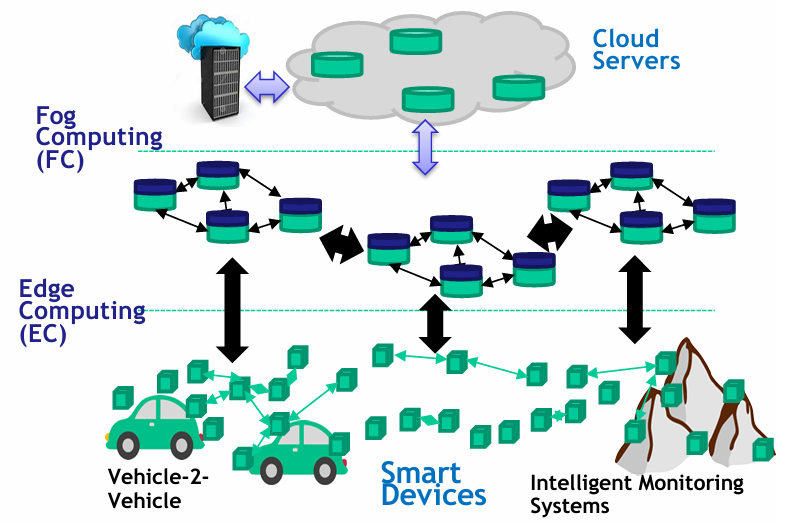
Both edge and fog computing are designed to reduce latency and bandwidth usage by processing data closer to the source of the data. This can be useful in situations where real-time processing is required, or where the data is sensitive and needs to be processed locally.
Edge and Fog computing are used in many different applications, such as smart cities, autonomous vehicles, and industrial automation.
- Pros
- High computational capacity
- Distributed computing: the data is processed closest to the source of the data
- Privacy and security are guaranteed because the data is processed locally
- Low latency when processing data in order to take real-time decisions
- Cons
- Require a power connection and battery solution is no more possible
- Require a stable connection with the cloud in order to send the data (processed or raw)
Datacenters
Definition
A data center is a facility used to house computer systems and associated components, such as telecommunications and storage systems. It generally includes redundant backup power supplies, redundant communications connections, environmental controls (e.g., air conditioning, fire suppression) and various security devices.
These infrastructure are huge and are used to store and process a lot of data and many different data types. They could be specialized in processing data (like HPC datacenters) or in storing data (like cloud datacenters) or for communication (like telecommunication datacenters).
Due to their size, they must be placed in a secure site, with a lot of space around in order to be expanded in the future. They must have several power sources (like solar plants, wind plants, etc.) in order to be always on, and placed in a cool place in order to avoid overheating. If there is a water source nearby (like a river or a lake), it is possible to use it to cool the datacenter. They also need to have a fire suppression system and a strong security system in order to protect the data stored inside.
They run services using different solution, like virtualization (providing the full stack architecture, like OS, libs and applications, everything running on a guest OS) or containerization (where the apps are packaged with all their dependencies into a standardized unit for software development/deployment).
- Pros
- Low IT costs: the datacenter is a shared infrastructure, so the costs are shared among all the users
- High performance: it can host high performance computing systems, like GPU, FPGA, etc.
- Instant software updates: the software is updated by the datacenter provider, so the user does not have to worry about it
- “Unlimited” storage capacity
- Increased data reliability
- Universal data access: the data is accessible from anywhere via the internet
- Device independence: the data is accessible from any device and user to not have to worry about the device they are using
- Cons
- Require a constant Internet connection to provide the services
- Do not work well with low-speed connections
- Hardware features might be limited by the datacenter provider
- Privacy and security issues
- High power consumption
- Latency in making decision
An IT perspective for computing infrastructures
From an IT perspective, computing infrastructures are the backbone of any organization. They provide the hardware and software needed to run the organization’s applications and services and provide the network connectivity needed to connect the organization’s systems and users. Without a computing infrastructure, an organization would not be able to function.
A computing infrastructure is made up of 3 levels:
- Hardware: This includes the physical components of the infrastructure, such as servers, storage devices, networking equipment, and other devices. These components are used to run the organization’s applications and services and provide the network connectivity needed to connect the organization’s systems and users.
- Software (Environment): This includes the software and the libraries necessary to control the physical resources and provide tools to build applications.
- Software (Applications): This includes the applications and services that run on the infrastructure, such as email, databases, and web servers.
flowchart LR
    subgraph Example
    direction BT
        CBA[Cloud-based Applications]
        C[Cloud]
        DC[Datacenter]
    end

    subgraph Infrastructure
    direction BT
        SWA[Software Application]
        SWE[Software Environment]
        HW[Hardware]
    end

    SWA --> CBA
    SWE --> C
    HW --> DC