In the context of virtualization, hardware resources (like CPU and RAM) are partitioned and shared among multiple virtual machines (VMs). The virtual machine monitor (VMM) plays a crucial role in governing the access to these physical resources among the running VMs. This approach offers several benefits, including improved performance, enhanced isolation, and strengthened security.
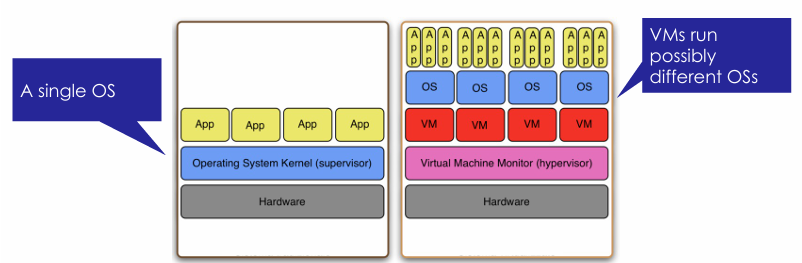
By partitioning the hardware resources, each VM is allocated a portion of the available CPU and RAM, ensuring that they have dedicated resources to execute their tasks efficiently. This allows for optimal utilization of the underlying hardware, as multiple VMs can run simultaneously without interfering with each other’s performance.
Moreover, the VMM acts as a mediator between the VMs and the physical resources. It controls the allocation of resources, ensuring that each VM receives its fair share and preventing any single VM from monopolizing the resources. This resource management capability helps maintain a balanced and efficient execution environment.
In addition to performance benefits, virtualization also provides enhanced isolation between VMs. Each VM operates in its own isolated environment, with its own operating system and applications. This isolation prevents any issues or vulnerabilities in one VM from affecting others, thereby improving the overall security of the system. It can implement access controls, encryption, and other security mechanisms to safeguard the VMs from unauthorized access or malicious activities. This layered security approach adds an extra layer of protection to the virtualized environment.
Computer architecture
In a computing infrastructure, the set of instructions that a program can use might be structured at different levels. We usually define 5 levels of machine instructions:
- Digital logic (binary ports, digital devices, etc.)
- Microarchitecture level (e.g., x86, ARM, etc.)
- Instruction Set Architecture (ISA)
- Operating System machine level
- Assembly language
- Problem-oriented language
flowchart BT
    0[0: Digital logic level]
    1[1: Microarchitecture level]
    2[2: Instruction Set Architecture level]
    3[3: Operating System machine level]
    4[4: Assembly language level]
    5[5: Problem-oriented language level]

    0 -- Hardware --> 1
    1 -- Interpretation (microprogram) or direct execution --> 2
    2 -- Partial interpretation (OS) --> 3
    3 -- Translation (Assembler) --> 4
    4 -- Compilation --> 5
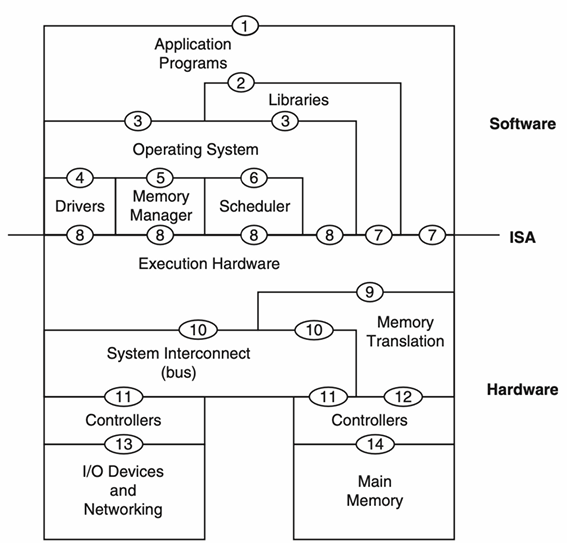
A developer usually program the software part, exploiting the hardware: this means that we program only the levels 5-3. The ISA (level 2) marks the division between hardware and software design. We can distinguish two types of ISAs:
- User ISA: aspects of the ISA that are visible to an application program (e.g., sum, multiplication, logical operations, branches, etc.). When an application interacts with the hardware, the User ISA is used.
- System ISA: aspects visible to supervisor software (i.e., the OS) which is responsible for managing hardware resources (e.g., hide the complexity of CPUs, define how apps access memory, communicate with the hardware). When the OS interacts with the hardware (drivers, memory management, scheduling), the System ISA is used.
The ABI (Application Binary Interface) corresponds to level 3 in the layered execution model. It provides a program (via the OS) the hardware resources and services available in a system. We distinguish between user ABI and system calls. The user ABI is related to the aspects of the ISA that are visible to an application program, while system calls are calls that allow programs to interact with shared hardware resources indirectly by the OS. A system call is a call to the OS that allows the program to interact with shared hardware resources indirectly by the OS.
Virtual Machines
Definition
A Virtual Machine (VM) is a logical abstraction able to provide a virtualized execution environment. More specifically, a VM:
- provides identical software behavior (identical to a physical machine)
- consists of a combination of a physical machine and virtualizing software
- may appear as different resources than a physical machine
- may result in different levels of performance
The two types of virtual machines can be distinguished based on their tasks. They are responsible for mapping virtual resources or states to corresponding physical ones and executing the virtual instructions/calls using physical machine instructions/calls. We can distinguish between two types of VMs:
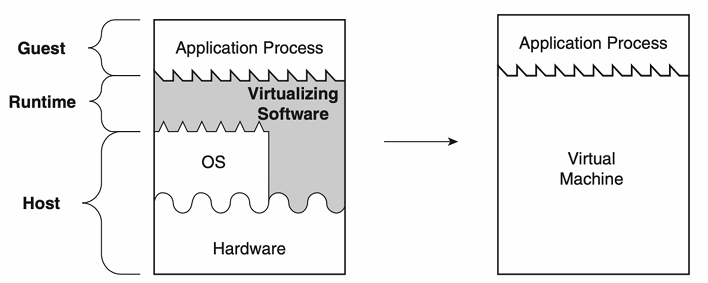
- Process VMs: the runtime software supports the levels 0-3 of the architecture, this means that the VM provides a complete system environment that can support an application. The virtualizing software is placed at the ABI interface, on top of the OS/hardware combination and emulates both user-level instructions and operating system calls. This software is usually called Runtime Software.
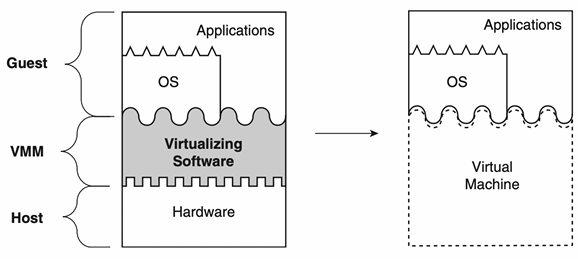
- System VMs: the VMM supports the levels 0-2 of the architecture, this means that a system VM provides a complete system environment that can support an operating system (potentially with many user processes). It provides operating system running in it access to underlying hardware resources (networking, I/O, a GUI). The virtualizing software is placed between hardware and software and emulates the ISA interface seen by software. This software is called VMM (Virtual Machine Monitor) and provide its functionality either working directly on the hardware or running on another OS.
Definitions
- Host: the underlying platform supporting the environment/system where the VM runs
- Guest: the software that runs in the VM environment as the guest
Virtualization implementation
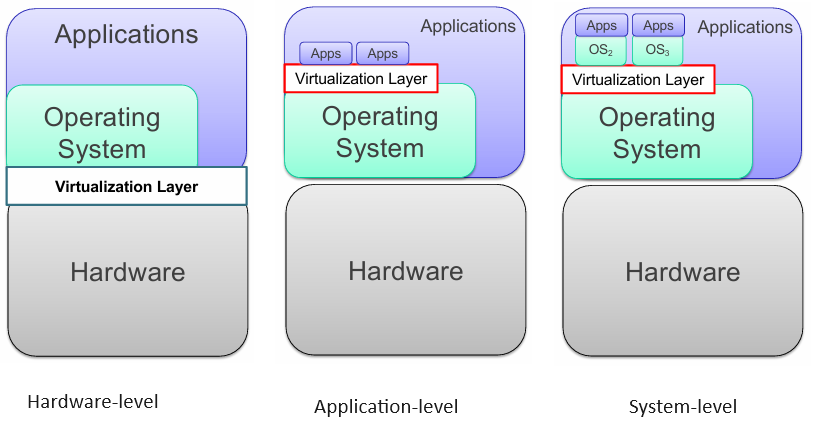
Given a typical layered architecture of a system, virtualization is implemented by adding layers between execution stack layers. Depending on where the new layer is placed, we obtain different types of virtualization:
- Hardware-level virtualization: the virtualization layer is placed between hardware and OS. The interface seen by the OS and application might be different from the physical one. The VMM is responsible for managing the hardware resources and providing the interface to the OS and applications.
- Application-level virtualization: a virtualization layer is placed between the OS and some applications. For example, the JVM (Java Virtual Machine) provides the same interface to the applications independently from the OS.
- System-level virtualization: the virtualization layer provides the interface of a physical machine to a secondary OS and a set of applications running in it, allowing them to run on top of an existing OS. This type of virtualization enables several OSs to run on a single hardware. Typical examples are VMware, VirtualBox, and KVM.
Properties of virtualization technologies
- Partitioning: it involves running multiple operating systems on a single physical machine and allocating resources between the different virtual machines.
- Isolation: it provides fault tolerance and security at the hardware level, along with advanced resource control to ensure optimal performance, which is managed by the hypervisor.
- Encapsulation: the entire state of a virtual machine can be saved in a file, allowing for actions like freezing and restarting the execution. Virtual machines can also be easily copied or moved as files.
- Hardware Independence: it enables provisioning and migration of a specific virtual machine on any compatible physical server.
| Advantages of virtualization | |
|---|---|
| Cost reduction | It allows for the consolidation of multiple physical servers into a single physical server, reducing hardware costs, power consumption, and cooling systems requirements. |
| Improved resource utilization | It enables the efficient use of hardware resources by running multiple virtual machines on a single physical server. |
| Enhanced security | It provides isolation between virtual machines, preventing one VM from affecting others. |
| Flexibility and scalability | It allows for the easy creation, deployment, and scaling of virtual machines to meet changing business needs. |
| Disaster recovery | It simplifies backup and recovery processes by encapsulating the entire state of a virtual machine in a file. |
| Testing and development | It provides a safe and isolated environment for testing and development purposes. |
| Legacy application support | It enables the running of legacy applications on modern hardware. |
| Energy efficiency | It reduces power consumption by consolidating multiple physical servers into a single physical server. |
Virtual Machine Managers
Definition
A Virtual Machine Manager is an application that manages the virtual machines, mediates access to the hardware resources on the physical host system, intercepts and handles any privileged or protected instructions issued by the virtual machines.
This type of virtualization typically runs virtual machines whose operating system, libraries, and utilities have been compiled for the same type of processor and instruction set as the physical machine on which the virtual systems are running. Virtual Machine Managers are crucial to support Cloud Computing.
Three terms are used to identify the same thing: Virtual Machine Manager, Virtual Machine Monitor, and Hypervisor. Some authors give slightly different meanings to the three:
QUOTE
- Virtual Machine Monitor: the virtualization software.
- Hypervisor: a virtualization software that runs directly on the hardware.
- Virtual Machine Manager: a VMM or Hypervisor that is also used to create, configure, and maintain virtualized resources. It provides a user-friendly interface to the underlying virtualization software.
We can distinguish between two types of hypervisors:
-
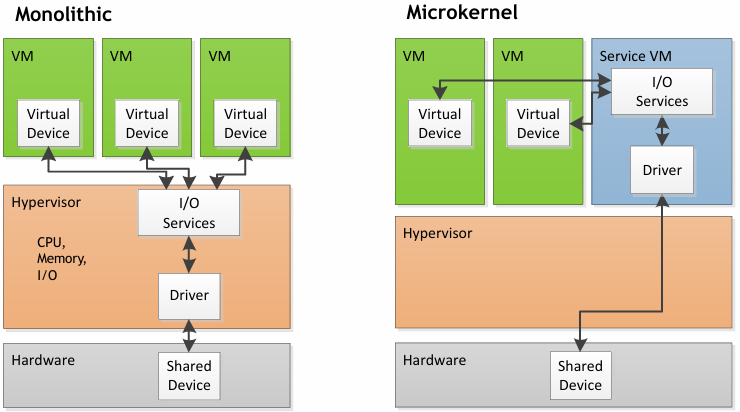
Bare-metal or type 1 hypervisors: take direct control of the hardware. The hypervisor is also called “native” or “bare metal” because it runs directly on the hardware. There are two different types of type 1 hypervisors: monolithic and microkernel:
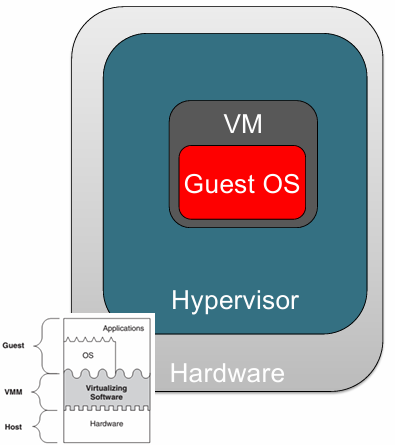
- Monolithic: device drivers run within the hypervisor. This type of hypervisor has better performance and isolation, but can run only on hardware for which the hypervisor has drivers.
- Microkernel: device drivers run within a service VM. This type of hypervisor has a smaller footprint and leverages the driver ecosystem of an existing OS. It can use 3rd party drivers, even if recompiling might be required.
 Examples include KVM, Microsoft Hyper-V, and VMware vSphere.
-
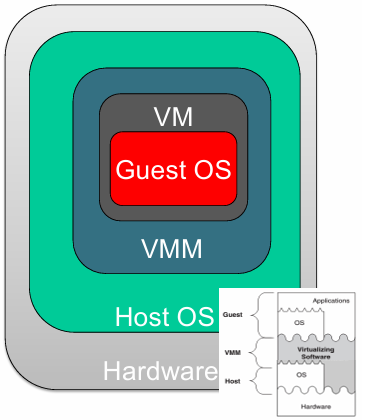
Hosted or type 2 hypervisors: reside within a host operating system. This type of hypervisor is also called “hosted”. The VMM runs in the Host OS, and the Guest OS is the one that runs in the VM while applications run in the Guest OS. Hosted hypervisors leverage the code of the host OS and are more flexible in terms of underlying hardware. They are simpler to manage and configure, but the Host OS might consume a non-negligible set of physical resources. Examples include VMware Workstation and Oracle VirtualBox.
System-Level Virtualization Techniques
There are two main system-level virtualization techniques:
- Full Virtualization
- Paravirtualization
Full Virtualization
Definition
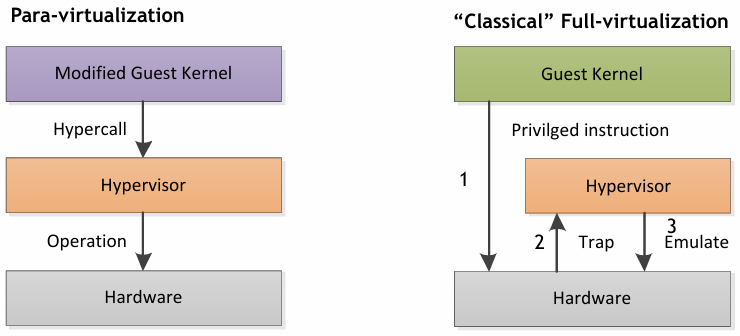
Full virtualization provides a complete simulation of the underlying hardware. It simulates the full instruction set, input/output operations, interrupts, and memory access. Some protected instructions are trapped and handled by the hypervisor.
The main advantage of full virtualization is that it allows running unmodified operating systems and provides complete isolation between virtual machines. This means that each virtual machine operates as if it were running on its own dedicated physical hardware. However, full virtualization does have some performance overhead due to the need for hypervisor mediation. Additionally, it may not be available on every architecture and requires hardware support for virtualization.
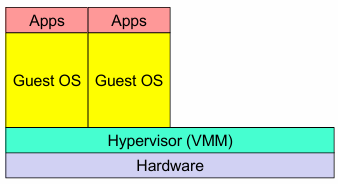
Despite these limitations, full virtualization is widely used in enterprise environments for its ability to run a wide range of operating systems and provide strong isolation between virtual machines. It is particularly useful for running legacy applications, testing and development environments, and creating secure sandboxed environments for running untrusted code.
Paravirtualization
Definition
Paravirtualization is a technique where the guest OS and VMM collaborate. The VMM presents to VMs an interface similar but not identical to that of the underlying hardware, because it reduces the guest’s execution of tasks too expensive for the virtualized environment by means of “hooks” to allow the guest(s) and host to request and acknowledge tasks which would otherwise be executed in the virtual domain.
The main advantage of paravirtualization is that it provides a simpler VMM and high performance. However, it requires a modified guest OS and cannot be used with traditional OSs (e.g., available on some Linux releases).
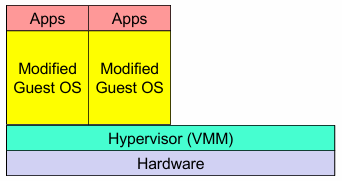
Paravirtualization is particularly useful in scenarios where performance is critical and the guest OS can be modified to take advantage of the virtualized environment. It allows for efficient communication between the guest and host, reducing the overhead of virtualization and improving overall system performance. One common use case for paravirtualization is in cloud computing environments, where the guest OS can be customized to optimize performance and resource utilization. By leveraging paravirtualization, cloud providers can achieve better scalability and efficiency in their virtualized infrastructure.
It’s important to note that not all operating systems support paravirtualization. It requires specific modifications to the guest OS, which may not be available for all platforms. However, for those systems that do support it, paravirtualization can be a powerful tool for improving virtualization performance and efficiency.
Containers
Definition
Containers are pre-configured packages with everything you need to execute the code (code, libraries, variables, and configurations) in the target machine. The main advantage of containers is that their behavior is predictable, repeatable, and immutable.
VMs provide hardware virtualization, while containers provide virtualization at the operating system level. The main difference is that containers share the host system kernel with other containers. Containers are:
- Flexible: even the most complex applications can be containerized.
- Light: the containers exploit and share the host kernel.
- Interchangeable: updates and updates can be distributed on the fly.
- Portable: you can create locally, deploy in the Cloud, and run anywhere.
- Scalable: it is possible to automatically increase and distribute replicas of the container.
- Stackable: containers can be stacked vertically and on the fly.
Containers ease the deployment of applications and increase scalability, but they also impose a modular application development where the modules are independent and uncoupled. They help make local development and build workflows faster, more efficient, and more lightweight, run stand-alone services and applications consistently across multiple environments, create isolated instances to run tests, build and test complex applications and architectures on a local host prior to deployment into a production environment, build a multi-user Platform-as-a-Service (PaaS) infrastructure, provide lightweight stand-alone sandbox environments for developing, testing, and teaching technologies, and run Software as a Service applications.